
Pay for tickets
I want to use Charla in an internal workspace for clients, and would like the ability to charge for technical support, so when a new ticket (question) is submitted, the client pays. Is this something we can do?
Dark Mode
I would love to see a dark mode for the app that you can change in your profile or by your system settings. For windows, brower and android app.
Comment to DM
Add the possibility to trigger a DM in Instagram and Facebook, when a keyword is added in a comment.
support LINE messaging
could you make Charla support LINE? or any configuration? https://www.line.me/en/
25 May

Attachment preview on the chat
Can we make attachments visible in the chat? Every time I want to see an attachment a client sends from Instagram or Facebook, it won’t let me see it in the chat and redirects me to another site that never
Automatic training
It would be nice if charla would be automically trained on the posts without adding all the post links manually one by one.
15 Feb
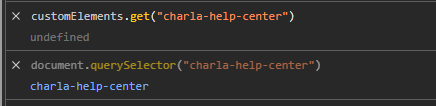
Help Center Web Component not re-initializing in SPA (customElements undefined on route change)
When embedding the Charla Help Center using help-center.js in a React SPA, the Help Center loads correctly on the first visit but fails on subsequent route visits without a full page reload. On failure, exists in the DOM, but customElements.get(“charla-help-center”)
Send Chat Closure Feedback Notifications on WhatsApp
When a live chat is closed, the system currently sends a closure notification to collect user feedback. We request the ability to send the same feedback notification via WhatsApp when the conversation originated from or is linked to WhatsApp. This
Fully White-Label and Customizable Live Chat Widget Design
We request the ability to fully white-label and customize the live chat widget design so it can be adapted to different website themes and brand identities. Currently, limited styling options restrict how well the chat widget blends with a website’s
Add Picture-in-Picture Mode for Live Chat When Users Switch Tabs
In many cases, users switch to other tabs or windows while a live chat is ongoing. When this happens, the chat connection often becomes inactive, and users do not see agent replies unless they return to the tab or refresh

Recent Comments
Playing Audio
YehiaVoice messages
YehiaSupport tickets on mobile
YehiaData Source: Shopify Products
YehiaChat Transcript Sent to Custom Email
Arjun